
PUBG Mobile · GameLoop
Graphics up to 120 FPS
Pick a ready preset or choose graphics, frame rate and anti-aliasing yourself, then press Apply to PUBG. Your old files are backed up first.
For PUBG Mobile on GameLoop
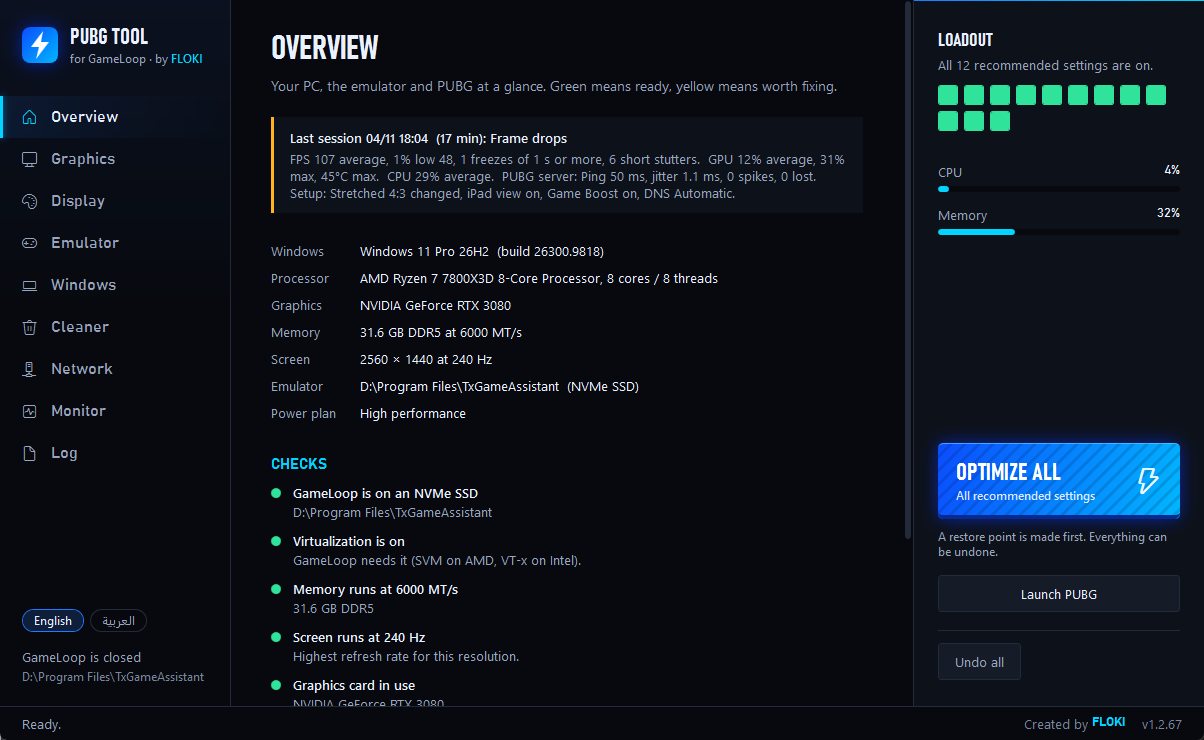
PUBG Mobile up to 120 FPS, fewer stutters and a clear view of your ping. Every change can be undone in one click.
The trade
Players lose evenings to guides, registry edits and settings that do nothing. PUBG Tool puts what works behind one button.
By hand
Hours
With PUBG Tool
About a minute
Inside the app
Each page does one job, in plain words.
PUBG Mobile · GameLoop
Pick a ready preset or choose graphics, frame rate and anti-aliasing yourself, then press Apply to PUBG. Your old files are backed up first.
Windows
One button applies the recommended Windows settings. Game Boost closes the apps you choose while GameLoop is open and opens them again after.
GameLoop
Engine settings, iPad view and a 4:3 screen in one place. If GameLoop is stuck or will not start, one button restarts it cleanly.
FPS · Ping
FPS and ping over the game, stutters counted, and reports that show which setting really changes your game.
Ping · DNS
Test your line, follow the road to the PUBG server router by router, and see where the delay starts.
Windows
Removes temp files, crash dumps and logs that only take space. Files in use are skipped, so nothing breaks.
Safety
PUBG Tool makes a Windows restore point before big changes and backs up the game's settings file. Undo all puts back the Windows and GameLoop settings it changed, and Restore brings back the game file.
Get PUBG-Tool.zip, extract it and run PUBG-Tool.exe.
Every feature is open for 3 days on your PC. No card, no account.
Like it? Send us your PC number, pay, and we send your key.
Prices
Try every feature for 3 days first. Pay only if it helps.
Pay with BaridiMob / CCP
Buy a keyPay with USDT · Payoneer · PayPal
Buy a keyYou pay by hand: message us on WhatsApp or Discord and we tell you how to pay. The key works on your PC only.
PUBG Tool changes the game's settings files. PUBG's rules forbid third-party tools like this, so a ban is possible, even if rare. Use it at your own risk. The Graphics page changes those files; the other pages do not touch the game. We say it plainly so you can decide before you buy.
Your PC gets 3 days with every feature from the first start. It needs the internet once to start the trial.
No. The trial belongs to your PC, so a reinstall keeps the same end date.
One. The key is made for your PC number.
Message us with your new PC number and we sort it out.
Once, to start the trial. A key keeps working without the internet.
As soon as we confirm your payment. We answer on WhatsApp and Discord.
Yes, within 48 hours if your key does not work or PUBG Tool does not start on your PC and we cannot fix it. Terms & refunds
Windows 10 or 11, GameLoop with PUBG Mobile, and administrator rights on the PC.